For families · iPhone and Android
Their whole story, in one private place.
- Health, vaccinations, allergies and growth
- School records, documents and keepsakes
- Share with family, child by child
- Approve every school, clinic and emergency request
Emergency child information
Vinenux gives schools, hospitals and carers the allergies, conditions and contacts they need in an emergency — released only when the child’s guardian approves the request.
Guardian-approved access. Every lookup logged.
The platform
Guardians keep their child’s whole story in the Vinenux mobile app. Schools, hospitals, clinics and carers use the web portal to ask for what they need, and see it only once the guardian says yes.
For families · iPhone and Android
For organisations · Web portal
One platform
Emergency details live with the guardian and are shared deliberately — never copied into a folder that goes out of date the week after it is filled in.
A guardian records their child’s information once. Vinenux issues a single code that works anywhere care happens.
Nothing is released on the code alone. The guardian sees who is asking and decides, in the moment, whether to release it.
Life-threatening allergies first, then conditions, medications and who to call. Read at a glance, under pressure.
Approvals are time-limited and revocable. Guardians can see every lookup and end access at any point.
How it works
Vinenux is built around consent rather than possession of a code. Here is the whole path, start to finish.
In the Vinenux app a guardian records allergies, conditions, medications, special needs and emergency contacts — and keeps them current.
For example: Ama’s guardian adds a life-threatening peanut allergy.
Each child gets one durable code, shareable as text or a QR label for a bag, lunchbox or enrolment form.
For example: VX-7K4PQ-92QMX
A signed-in school, hospital or carer enters the code. Accounts are required, so a guardian always knows who is on the other end.
For example: Ridge Hospital requests access.
A request lands on the guardian’s phone naming the organisation and what it is asking for. They approve or decline.
For example: Approved — allergies, conditions, contacts.
The approved information appears immediately, ordered by clinical urgency, with one-tap calling for emergency contacts.
For example: Peanuts — life-threatening, shown first.
Every lookup is recorded. Approvals expire on their own, and a guardian can revoke access at any moment.
For example: Access ends automatically.
Solutions
The same child record, presented differently depending on who is looking and what they have been permitted to see.
For guardians
For schools & childcare
For hospitals & clinics
Ama Boateng
7 years Primary 3 Blood O+
Allergies
Conditions & medication
Emergency contact
School records
The Vinenux app
A private record keeper for your child’s life. Health records, school reports, documents, milestones, memories and money, kept together in one secure place that you control.
Seven screens from the app
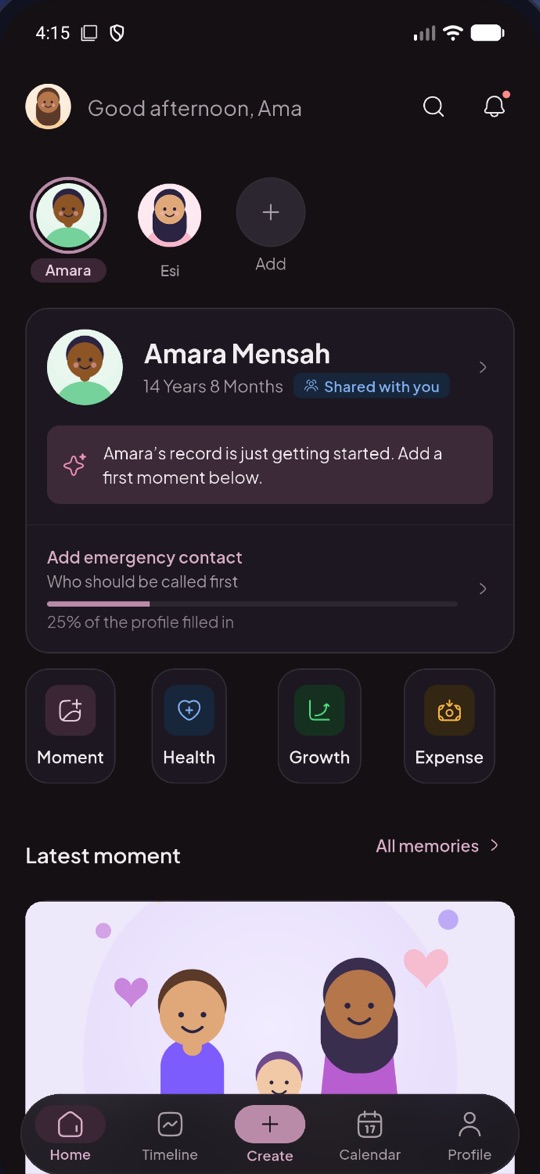


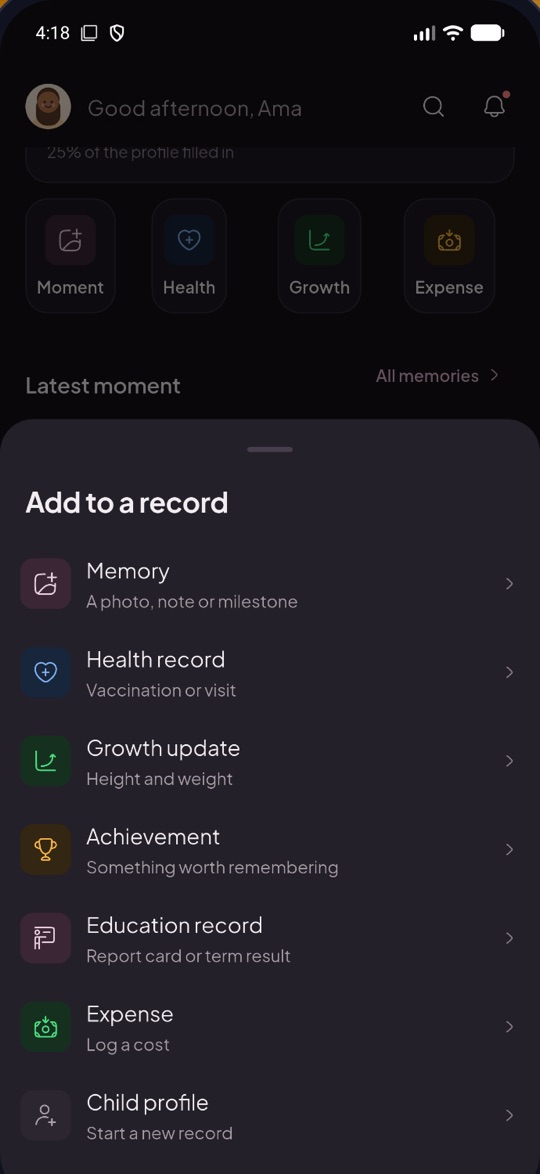

Organisations
The organisation portal is built for institutions with hundreds of children and dozens of staff — not a spreadsheet with a login.
Here’s what changed at Sunrise Primary today.
Connected children
248
+12 this month
Pending requests
3
Awaiting guardians
Staff
34
1 invite pending
Records this week
126
+18 vs last week
Emergency lookups this week
Recent activity
| Child | Class | Alerts | Access | Open |
|---|---|---|---|---|
| Ama Boateng | P3 | Peanut · Life-threatening | EmergencyAcademic | |
| Kofi Mensah | P1 | No alerts | EmergencyAttendance | |
| Efua Danso | P4 | Penicillin · Moderate | Emergency | |
| Yaw Owusu | P2 | No alerts | EmergencyAcademic | |
| Akua Asante | P5 | Egg · Severe | EmergencyHealth | |
| Kwabena Ofori | P3 | No alerts | Emergency | |
| Abena Osei | P6 | Asthma · Condition | EmergencyHealth | |
| Kojo Appiah | P2 | Latex · Mild | EmergencyBehaviour | |
| Adwoa Agyeman | P4 | No alerts | EmergencyAcademic | |
| Nana Adjei | P1 | Sesame · Severe | Emergency | |
| Esi Quaye | P5 | No alerts | EmergencyAttendance | |
| Kwesi Amoah | P6 | Shellfish · Life-threatening | EmergencyHealth |
No children match “”.
Nothing about a child is shown until their guardian approves.
| Name | Role | Permissions | Status |
|---|---|---|---|
| Adjoa Larbi | Administrator | 14 of 14 permissions | Active |
| Kwame Asare | Teacher | 9 of 14 permissions | Active |
| Abena Mensah | Nurse | 6 of 14 permissions | Active |
| Yaa Frimpong | Counselor | 7 of 14 permissions | Active |
| Kofi Badu | Receptionist | 3 of 14 permissions | Active |
| Esi Nyarko | Teacher | 9 of 14 permissions | Invited |
Every request, approval, revocation and staff change.
Find a child by name in a list of hundreds, paginated so the interface stays fast however many you connect.
Invite teachers, nurses and administrators. Each role starts from a sensible permission set you can adjust before sending.
Academic, attendance, behaviour, incident and health entries, filtered by category and attributed to your organisation.
Every request, approval, revocation and staff change is recorded and reviewable from the Activity tab.
Security & privacy
Children’s medical information deserves more than a password and a promise. These are the specific controls Vinenux enforces — no more, and no marketing around them.
Access is written to an audit trail the guardian can review, and can be withdrawn at any time.
Requesters must hold an account, so the guardian is always shown a named organisation rather than an unknown device.
Requests expire if they are not answered, and approvals expire on their own rather than lasting indefinitely.
The emergency response is assembled server-side from a fixed set of fields — the browser is never sent the full child record.
Authentication, data and server logic run on Google Firebase, with access rules enforced server-side rather than in the browser.
Why it matters
When a child cannot speak for themselves, the difference between safe treatment and a dangerous guess is whether anyone in the room knows their history.
Minutes
The window in which an anaphylactic reaction must be recognised and treated.
One code
Replaces the emergency form that was filled in at enrolment and never updated.
Every lookup
Recorded against a named organisation and visible to the guardian who approved it.
A guardian should never have to choose between sharing everything about their child and sharing nothing at all.
 The principle Vinenux is built on
Create an organisation account in a couple of minutes. Guardians stay in control of every request you make.
A guardian? Explore the Vinenux app